I'm Chirag Kular — a web developer and digital specialist helping businesses grow online through smart development, SEO, and digital marketing.
Loading
I'm Chirag Kular — a web developer and digital specialist helping businesses grow online through smart development, SEO, and digital marketing.

Tracking Time
C#
.NET, React
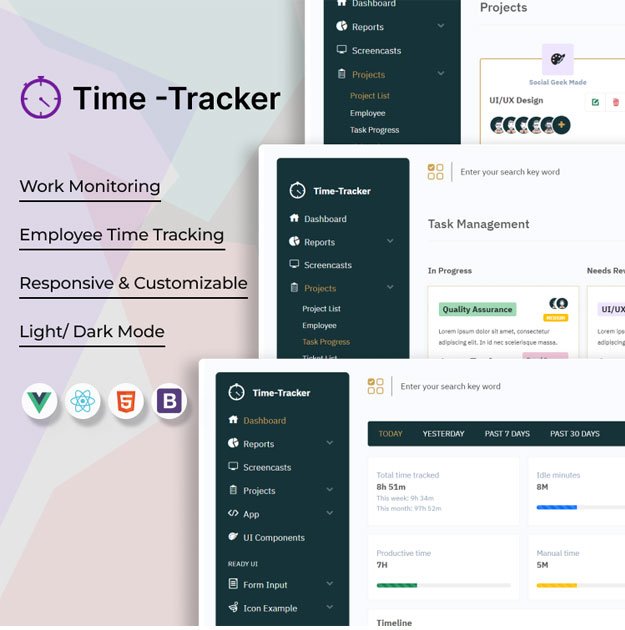
The time-tracking application helps organisations review work hours and activity across office-based and remote teams. Alongside time records, it can capture periodic screenshots, record browser activity, and monitor application use. A central dashboard presents daily, weekly, and monthly summaries for individuals or teams.
Screenshot Capture: Take screenshots at scheduled intervals to provide a record of activity during working time.
Browser Activity Tracking: Record which websites are visited and how much time is spent on them.
Application Monitoring: Track active desktop applications and review usage patterns.
Customizable Reporting: Create and export activity and time reports to help examine work patterns and productivity over time.
With reporting and monitoring features in one place, the system can help managers review schedules, understand how resources are being used, and maintain visibility across teams of different sizes.
Web & app usage
Screenshots
Executive dashboards
Attendance tracking
Work scheduling
Daily email notifications
Every feature was carefully considered and built to solve a real problem — not added for the sake of it.
Memory Utilization: The desktop client is described as designed to use system memory efficiently, helping reduce the impact on an employee’s computer while monitoring is active.
Remote Desktop Protocol: RDP support can help organisations deploy and monitor the tool in remote desktop environments without requiring a separate installation process on every individual workstation.
On-Demand Screen Capture: In addition to scheduled screenshots, the tool can capture a screen when requested, providing an additional view of activity at a particular moment.
On-screen widget: A visible widget informs employees that tracking is active, making monitoring more transparent and helping users distinguish work activity from personal use.
Integrations: Integration options can pass relevant updates into connected systems and make activity information easier to access within existing workflows.